Nuclay Solutions – Your One Stop Digital Solution

Nuclay Solutions

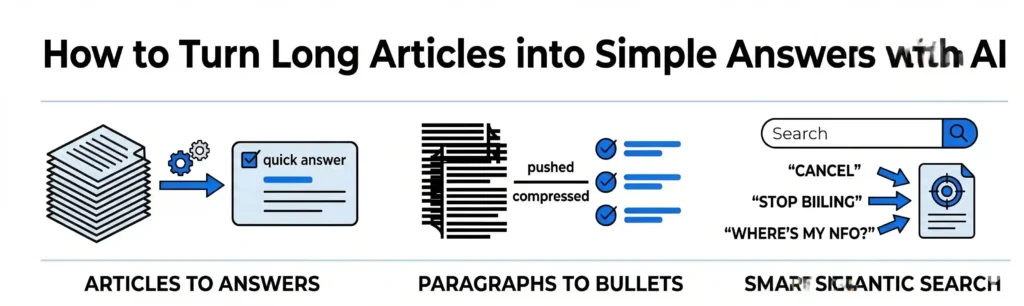
Minimalist horizontal banner with the title "How to Turn Long Articles into Simple Answers with AI". It features three vector graphics showcasing the transformation of long text documents into quick answers, paragraphs into checklists, and a smart search bar.
App Development, Content, CRM, Databases, Digital Marketing, Information, LLM & AI Chatbot, Salesforce, SEO, Technology, Trends, Website Design, Website Development

AI for Help Pages: How to Turn Long Articles into Simple Answers

When a customer has a problem, they want an immediate solution, not a reading assignment. Most company help desks or support portals are filled with massive, text-heavy articles. If a user is trying to find a quick answer – like how to update their billing info or cancel an automatic renewal – they are forced to scroll through pages of technical instructions. When finding an answer feels like homework, customers give up and flood your support team with angry emails. Simple AI tools can fix your support center layout. By utilizing technology to summarize long articles and provide quick text snippets, you can deliver the exact answer your customer needs in seconds. 1. Summarizing Long Manuals into One-Sentence Highlights Many help articles are long because they try to explain the entire history or every single edge case of a feature. While this detail is sometimes necessary, 90% of your visitors only care about the immediate fix. 2. Using Bullet Points to Replace Dense Paragraphs When humans write technical documentation, they often write in long, complicated paragraphs. Dense blocks of text are incredibly hard to read, especially for a frustrated customer browsing on a mobile screen. 3. Creating Smart Search Bars That Understand What Users Mean Traditional help desk search bars are rigid. If an article uses the term “Subscription Management” but a user types in “stop paying,” the search bar might show zero results. The Outcome: Faster Resolutions with Zero Team Effort A successful help page does not prove how thorough your documentation is; it proves how fast you can unblock a customer. By letting AI create quick highlights, clean up paragraphs into bullet points, and power your search bar, you turn a cluttered archive into a fast-moving, helpful asset. At Nuclay Solutions, we focus on removing friction from your digital platforms. We help you build smart help hubs that give your users instant clarity, keeping your customers happy while giving your support team their time back. Are Your Help Pages Hiding The Answers? Stop losing users to dense text. Connect with Nuclay to turn long manuals into fast, simple answers. Simplify Your Support
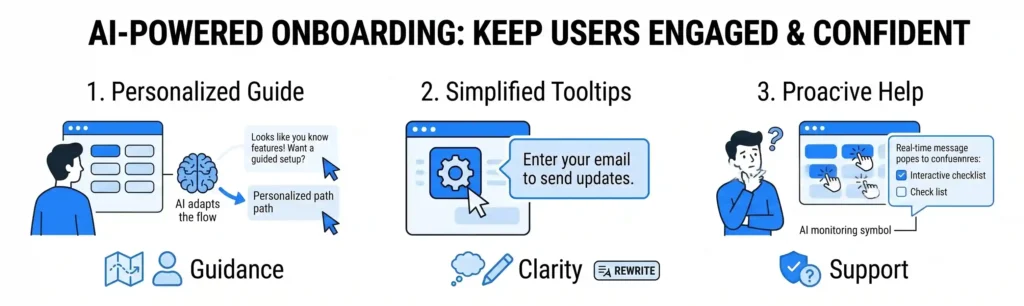
Horizontal banner titled "AI-POWERED ONBOARDING: KEEP USERS ENGAGED & CONFIDENT". It features a three-step visual flow using minimal blue and black vector graphics on a white background: 1. Personalized Guide showing AI adapting user paths, 2. Simplified Tooltips demonstrating text rewriting, and 3. Proactive Help showing real-time confusion monitoring.
App Development, Content, CRM, Databases, Digital Marketing, Information, LLM & AI Chatbot, Salesforce, SEO, Technology, Trends, Website Design, Website Development

AI for Onboarding Pages: How to Help New Users Start Without Confusion

The first five minutes a user spends inside your platform or service will determine if they stay forever or quit immediately. When a client signs up for a new software portal, an online community, or a digital dashboard, they are often met with a blank screen and too many buttons. If your platform doesn’t guide them on what to do next, they will quickly feel overwhelmed, assume the system is too complicated, and never log back in. In 2026, AI-assisted onboarding pages are fixing this drop-off. By using simple AI tools to create step-by-step guides and friendly pop-up tips (called tooltips), you can help new users see the value of your platform instantly, without any confusion. 1. Creating Step-by-Step Guides That Adapt to the User Traditional platform onboarding usually forces every new user through the exact same 10-step tour. This is frustrating because an advanced user gets bored by simple explanations, while a beginner gets lost if the steps move too quickly. 2. Using Friendly Tooltips to Explain Hard Features A tooltip is a small information bubble that pops up when a user hovers their mouse over a button or a settings box. Usually, these text boxes are filled with dry technical instructions that don’t make much sense to a beginner. 3. Spotting Confusion Before the User Abandons the Page When people get confused by a digital platform, they don’t usually email support; they simply close the tab and forget about it. This behavior is called “rage clicking” or “stalling,” and it is the main reason new platforms lose users. The Outcome: Happy Users Who Stay Long-Term Onboarding shouldn’t feel like learning a complicated math equation. By using AI to customize your setup guides, simplify your feature explanations, and spot confusion early, you turn a complex setup process into an easy, welcoming experience. When users understand how your system helps them right away, they stay loyal to your business. At Nuclay Solutions, we focus on building digital systems that are intuitive and easy to navigate. We help you connect your platforms to smart, simple onboarding tools so your new customers can start using your services with absolute confidence. Losing Users During Onboarding? Stop the guesswork. Connect with Nuclay to fix your user flow and skyrocket conversions today. Fix My Onboarding

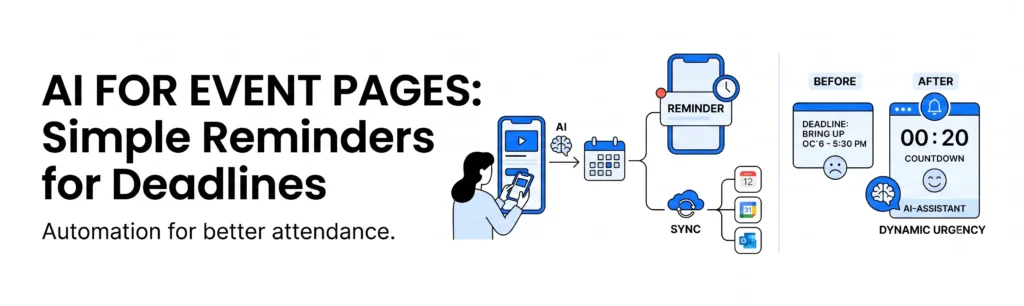
An infographic banner detailing how AI automates event pages, contrasting a static calendar (Problem) with automated reminders, calendar sync, and dynamic urgency (AI Solution) for higher attendance.
App Development, Content, CRM, Databases, Digital Marketing, Information, LLM & AI Chatbot, Salesforce, SEO, Technology, Trends, Website Design, Website Development

AI for Events Pages: How to Turn Deadlines into Simple Reminders

An event page shouldn’t just display a calendar; it should actively help people show up. Whether you are hosting a local school raffle, a corporate seminar, or a community workshop, your event page has one primary goal: getting people to register and attend. Yet, many organizations struggle with a common problem. Visitors land on the page, look at the dates, mean to sign up later, and then completely forget about it. Deadlines pass, and you miss out on attendees. In 2026, AI-assisted event management is solving this problem by turning static deadlines into proactive, automated reminders. Instead of forcing users to track your calendar manually, simple AI tools do the tracking for them. 1. Automated “Add to Calendar” Simplification One of the easiest ways to ensure someone forgets an event is to make the registration confirmation a static text block. If a user has to manually open their personal calendar app and type in your event details, they often skip the step entirely. 2. Smart, Behavior-Based Reminder Streams Sending a generic email blast to your entire registration list 24 hours before an event is no longer enough. Some users sign up three months in advance and need a slow nurture sequence, while others sign up the day before and just need a quick text message with a parking link. 3. Dynamic Urgency and Countdown Timers If your event features early-bird pricing or strict registration cut-offs, displaying a fixed date text (like “Registration closes October 14th”) doesn’t create immediate action. People see the date, assume they have plenty of time, and click away. 4. Syncing Internal Logistics with Public Calendars If you are managing an organization like a school or parish – similar to our brand project with St. John the Evangelist – schedules change constantly. A rainy day moves an outdoor festival inside, or a speaker cancellation shifts a seminar back by an hour. Manually updating the website, emailing attendees, and changing social media alerts is a massive operational delay. The Outcome: Higher Attendance with Zero Manual Tracking An event page is only successful if it bridges the gap between digital interest and physical attendance. By using AI to handle calendar syncing, automate personal reminder schedules, and update layout data in real-time, you turn your event page into an active organizational assistant. Your team stops chasing attendees, and your platform ensures your community shows up. At Nuclay Solutions, we specialize in building these automated, highly functional digital ecosystems. We help you use smart workflows to handle administrative details so you can focus on hosting an excellent event. Are Your Event Dates Sitting Silently On A Page? Make your website help people show up. Connect with the Nuclay team to automate your event pages. Automate Your Event Pages

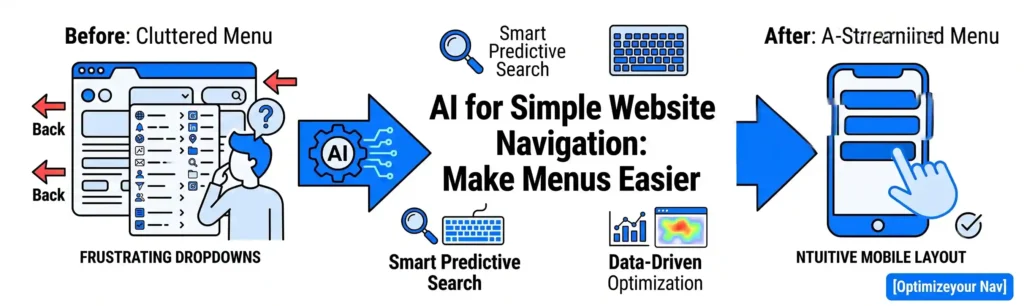
A horizontal vector banner comparing a cluttered desktop dropdown menu on the left to a clean, AI-optimized mobile menu layout on the right.
App Development, Content, CRM, Databases, Digital Marketing, Information, LLM & AI Chatbot, Salesforce, SEO, Technology, Trends, Website Design, Website Development

AI for Simple Website Navigation: How to Make Menus Easier to Use

If a visitor has to think about how to find a page on your website, your navigation has already failed. We have all experienced the frustration of visiting a website looking for a specific piece of information – like a pricing page, a support number, or a particular service – only to get lost in a massive, cluttered dropdown menu. When a menu feels like a maze, users don’t keep searching. They click the “Back” button and head straight to a competitor’s site. In 2026, AI-assisted navigation is changing how businesses structure their digital layouts. Instead of forcing users to adapt to rigid, confusing menu structures, simple AI tools analyze user behavior to make menus intuitive, organized, and remarkably easy to use. 1. Organizing Cluttered Links Based on Real User Data Many businesses make the mistake of putting every single page into their main header menu because they want to show everything they offer. This creates “cognitive overload” – a situation where a user is faced with so many choices that they end up choosing nothing at all. 2. Implementing Smart Predictive Search For websites with a lot of content – such as e-commerce stores, real estate listings, or extensive service catalogs – a traditional search bar can be clumsy. If a user mistypes a word or uses a slightly different term than what is written on your site, they get a frustrating “0 Results Found” page. 3. Dynamic “Quick Links” for Return Visitors A first-time visitor to your website is looking for very different information than a returning client. A prospect wants to see your portfolio and reviews; an existing customer is likely trying to find their portal login or contact support. 4. Keeping Mobile Menus Clean and Accessible Navigating a website on a desktop with a mouse is relatively easy. Navigating that same website on a small smartphone screen using a thumb is where most user experiences fall apart. Hamburger menus (the three little lines in the corner) often hide critical links too deeply. The Outcome: Clear Paths Lead to Higher Sales The best website navigation is invisible. When a menu is working perfectly, the user moves from landing page to checkout smoothly, without ever having to pause and look for where to click next. By letting AI analyze user habits, power your search, and clean up your mobile layouts, you ensure that your website acts as a guide rather than a barrier. At Nuclay Solutions, we specialize in building highly intuitive web architectures. We help you use data and smart design principles to clear away digital clutter, ensuring your prospective customers always find the fastest route to your solutions. Is Your Website Menu Getting In The Way? Stop letting confusing navigation drive customers away. Connect with the Nuclay team to streamline your links, build frictionless menus, and maximize conversions. Optimize Your Navigation

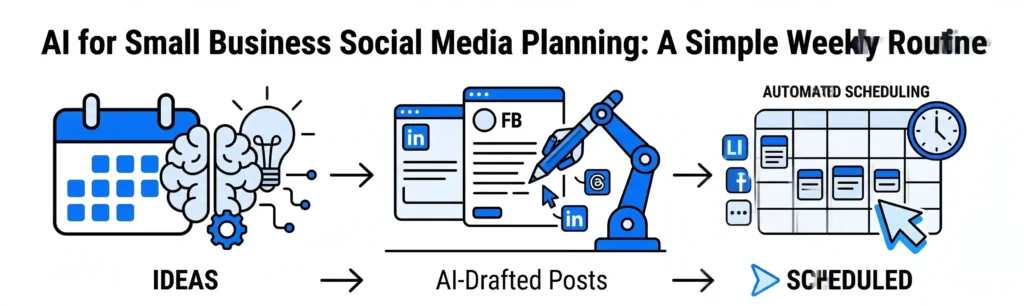
Flowchart for a small business weekly social media routine: brainstorm, draft, and schedule posts.
App Development, Content, CRM, Databases, Digital Marketing, Information, LLM & AI Chatbot, Salesforce, SEO, Technology, Trends, Website Design, Website Development

AI for Small Business Social Media Planning: A Simple Weekly Routine

You don’t need a full-time social media manager to maintain a consistent online presence. For most small business owners, social media feels like a relentless chore. You know you need to post to keep your brand visible, but coming up with fresh ideas, writing captions, and remembering to publish them every week takes up hours of valuable time. When business gets busy, social media is usually the first thing that gets forgotten. By establishing a simple AI-assisted weekly routine, you can automate the heavy lifting. Spending just 30 minutes once a week with a few basic AI tools can give you a consistent, professional content schedule – without the daily stress. The 3-Step Weekly Social Media Routine To keep things manageable, break your planning down into three simple steps performed once a week (like every Monday morning). Step 1: Monday Morning Idea Generation (10 Minutes) The hardest part of social media is staring at a blank screen wondering what to talk about. AI excels at breaking through writer’s block by generating dozens of relevant topics in seconds. Step 2: Drafting Simple, Platform-Specific Posts (15 Minutes) A post on LinkedIn requires a completely different tone of voice and layout than a quick update on Instagram or Facebook. Rewriting the same basic message to fit multiple platforms is tedious manual work. Step 3: Automated Basic Scheduling (5 Minutes) Logging into three different apps every day to copy, paste, and publish your content manually is an inefficient use of your time. The Outcome: Consistency Without the Overwhelm The secret to social media growth isn’t posting five times a day; it is being consistent enough that your audience remembers you when they need your service. By letting AI suggest your topics, format your captions, and schedule your posts, you turn a daily administrative burden into a structured, half-hour weekly system. At Nuclay Solutions, we focus on helping small businesses implement efficient digital workflows. We help you connect your core message to modern, automated tools so you can stay visible online while keeping your focus on running your business. Wasting Hours on Social Media With No Results? Stop letting content creation drain your time. Connect with the Nuclay team to automate your social media and fix your digital workflow today. Fix Your Workflow Now

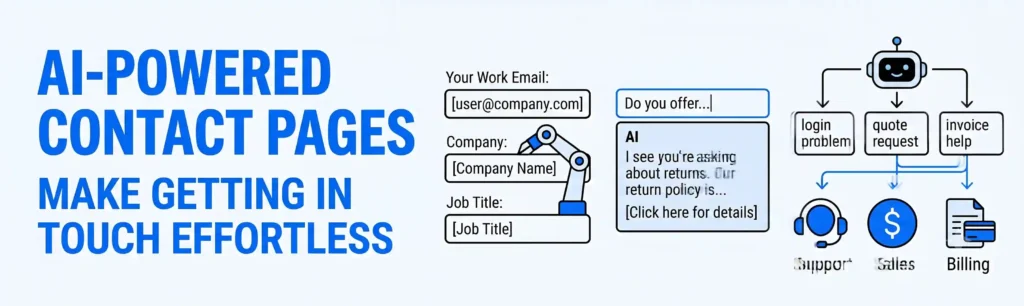
A horizontal blog banner with the title "AI-POWERED CONTACT PAGES." Features minimal vector graphics illustrating smart data autofill, real-time AI reply suggestions, and automated message routing using a white, black, and blue color palette.
App Development, Content, CRM, Databases, Information, LLM & AI Chatbot, Salesforce, SEO, Technology, Trends, Website Design, Website Development

AI for Contact Pages: How to Make Getting in Touch Feel Easier

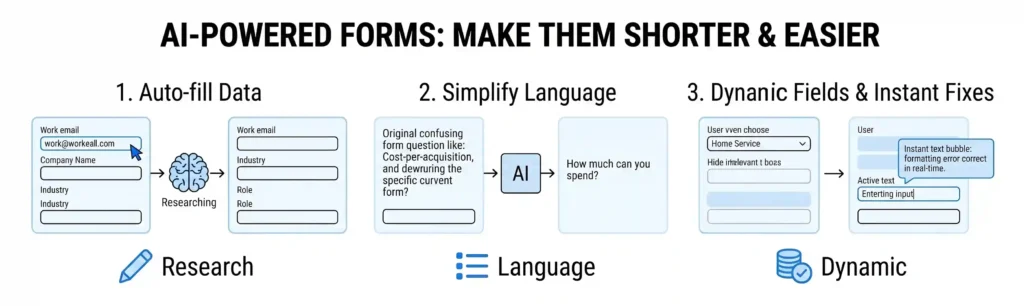
The biggest bottleneck on your website is likely a contact form that asks for too much information. The contact page is the final step before a prospect becomes a lead. Yet, many businesses treat this page like an interrogation, forcing users to fill out 10 different mandatory fields – such as company size, job title, phone number, and a detailed message description. The longer and more complicated a form is, the less likely a user is to finish it. In 2026, AI-assisted contact forms are removing this friction. By combining smart form design, automatic answer suggestions, and backend routing, you can make reaching out feel effortless while ensuring inquiries immediately reach the right department. 1. Simplifying Forms with Smart Fields Traditional contact forms use strict “Conditional Logic” to show or hide fields based on what the user selects. This can create a rigid and frustrating experience, especially on mobile devices where typing is more difficult. 2. Auto-Suggesting Solutions Before Submission Many people use a contact form to ask simple questions that are already answered on your website. This clutters your inbox and forces the user to wait hours for a simple reply. 3. Intelligent Backend Routing When a contact form is submitted, it usually goes into a general company inbox (like info@company.com). A human manager then has to read the message and forward it to Sales, Support, or Billing. This manual sorting causes massive delays. The Outcome: Faster Connections and Higher Conversions A contact page should be a bridge, not a barrier. By using AI to shorten the physical form, provide instant answers to basic questions, and handle the backend sorting, you turn a static webpage into an intelligent digital receptionist. Your users save time typing, and your team saves time organizing. At Nuclay Solutions, we focus on building frictionless user experiences. We help you integrate these smart AI workflows into your contact and lead-generation pages so that your information flows smoothly and your business responds faster. Welcoming New Clients or Turning Them Away? Stop losing high-value leads to rigid, complicated web forms. Connect with the Nuclay team to seamlessly optimize your website contact page. Optimize Your Contact Page

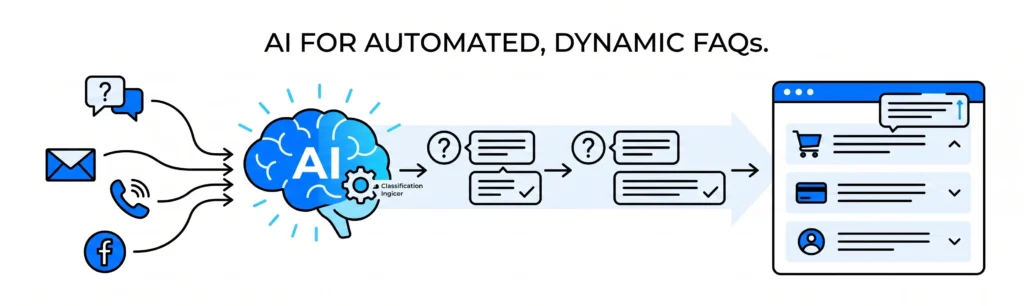
A horizontal workflow graphic showing customer communication channels feeding into a blue AI brain, which automatically processes and updates a clean website FAQ layout.
App Development, Content, CRM, Databases, Information, LLM & AI Chatbot, Salesforce, SEO, Technology, Trends, Website Design, Website Development

AI for FAQs: How to Keep Your Questions Page Simple and Up‑to‑Date

An FAQ page should be based on real customer questions, not guessing games. Many businesses build a Frequently Asked Questions (FAQ) page when they first launch their website and then never touch it again. Over time, that page becomes an outdated archive of things you thought customers would ask, while your support inbox fills up with the actual questions your users are struggling with daily. In 2026, AI-assisted support tools remove the guesswork from content management. By using simple AI systems to track customer interactions, you can automatically detect repetitive inquiries and update your website with clear, direct answers before the next support ticket is even submitted. 1. Detecting Repeated Inquiries Automatically Your customer support team, sales reps, and inbox managers handle dozens of messages every day. It is difficult for a human to manually track how many times a specific question is asked across email, live chat, and social media. 2. Suggesting Simple, Direct Answers Once a trending question is identified, the next challenge is writing a response that is easy to understand. When humans write FAQs, they often add unnecessary background information that makes the answer long and confusing. 3. Keeping Content Up-to-Date Without Code As your services, policies, or prices change, your FAQ page must change with them. An outdated FAQ page is worse than having no FAQ page at all, as it can mislead customers and cause compliance issues. 4. Organizing Layouts by Real-User Relevance Many FAQ pages are organized alphabetically or in a long, unorganized list that forces users to scroll endlessly. This clutter causes frustration and drives users to abandon the page. The Outcome: A Self-Improving Help Center An effective FAQ page is an active tool that saves your team time and removes friction for your buyers. By letting AI track repeated questions, simplify the answers, and manage the updates, you turn a static text page into a dynamic, self-improving help center. At Nuclay Solutions, we specialize in building these automated feedback loops. We help you connect your customer support insights directly to your website architecture, ensuring your digital presence stays simple, relevant, and automated. Answering Real Questions or Still Guessing? Stop losing users to outdated content and endless scrolling. Connect with the Nuclay team to seamlessly automate your website FAQs. Automate Your FAQs

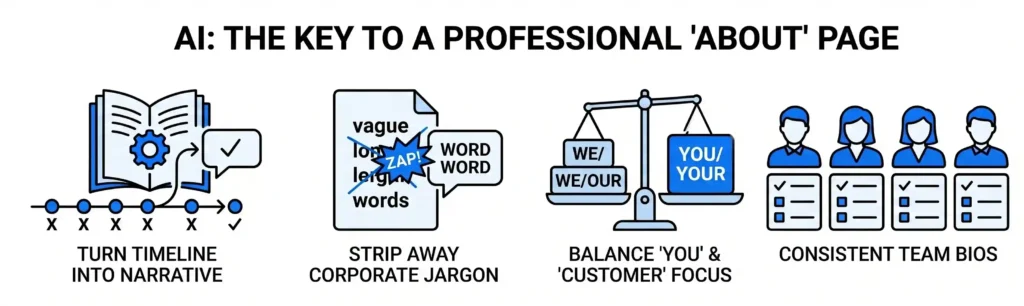
A horizontal minimal vector banner with a white background. At the top center, the main title reads "AI: THE KEY TO A PROFESSIONAL 'ABOUT' PAGE". Below it, four simple blue and black vector graphics are aligned perfectly: a book with a timeline ("TURN TIMELINE INTO NARRATIVE"), a document with crossed-out text ("STRIP AWAY CORPORATE JARGON"), a balance scale ("BALANCE 'YOU' & 'CUSTOMER' FOCUS"), and four uniform user profiles ("CONSISTENT TEAM BIOS").
App Development, Content, CRM, Databases, Information, LLM & AI Chatbot, Salesforce, SEO, Technology, Trends, Website Design, Website Development

AI for Testimonials: How to Turn Simple Feedback into Strong Proof

Real customer feedback is your most powerful sales tool, but only if your website visitors actually read it. When a customer leaves a review, they don’t usually write it with your marketing strategy in mind. They often send long, unstructured paragraphs filled with typos, or brief sentences like, “Great service, thanks!” While these comments are genuine, they do not always act as strong proof for a prospective buyer who is looking for specific results. In 2026, AI-assisted formatting tools make it easy to clean up raw feedback. AI can help you format long reviews and highlight key phrases to make them instantly skannable – all without changing the customer’s original meaning. 1. Highlighting the Most Impactful Phrases Most website visitors do not read every word on a testimonial page; they skim through the text looking for quick confirmation of value. If a powerful sentence is buried in the middle of a 200-word paragraph, it will likely be missed. 2. Formatting Long Text for Better Readability When clients are happy, they sometimes write a detailed message explaining their entire experience. While these details are great, dense walls of text can look unorganized on a modern service or checkout page. 3. Pulling Out “Snackable” Social Snippets Different parts of your website require different lengths of text. A dedicated “Success Stories” page can handle longer reviews, but a checkout sidebar or a homepage banner requires short, punchy statements. 4. Categorizing Testimonials by Customer Pain Points If you have dozens of reviews, displaying them in a random order isn’t very strategic. A prospect who is worried about price wants to see reviews about value, while a prospect worried about speed wants to see reviews about efficiency. The Outcome: Authentic Social Proof That Converts Potential clients trust the words of your current customers more than any sales copy you write. By using AI to highlight key phrases, organize long text, and place feedback where it matters most, you ensure your social proof is working for you. You don’t have to rewrite your clients’ words; you just have to use technology to make their voice clearer. At Nuclay Solutions, we integrate these smart testimonial systems into our web development projects. We help you showcase your client success stories in a clean, professional architecture that builds trust and drives growth. Easy to Skim or Hidden in Text Walls? Don’t let your best customer reviews go unnoticed. Connect with the Nuclay team to optimize your website social proof. Optimize Your Social Proof

A horizontal minimal vector banner with a white background. At the top center, the main title reads "AI: THE KEY TO A PROFESSIONAL 'ABOUT' PAGE". Below it, four simple blue and black vector graphics are aligned perfectly: a book with a timeline ("TURN TIMELINE INTO NARRATIVE"), a document with crossed-out text ("STRIP AWAY CORPORATE JARGON"), a balance scale ("BALANCE 'YOU' & 'CUSTOMER' FOCUS"), and four uniform user profiles ("CONSISTENT TEAM BIOS").
App Development, Content, CRM, Databases, Information, LLM & AI Chatbot, Salesforce, SEO, Technology, Trends, Website Design, Website Development

AI for About Pages: How to Tell Your Story in a Clear, Professional Way

An “About Us” page should not read like a formal corporate resume or a long personal diary. The “About” page is often one of the most visited pages on a company website. When people are deciding whether to do business with you, they want to know who is behind the brand and whether they can trust you. However, many companies struggle to write this page. They either fill it with empty corporate buzzwords (like “synergistic paradigms”) or write a long history that doesn’t explain how they actually help the customer.In 2026, AI-assisted editing tools are the most efficient way to balance professionalism with personality. AI can help you structure your company history into an engaging, clear narrative that builds immediate credibility. 1. Turning a Timeline into an Engaging Narrative Many businesses list their history as a dry timeline of dates: “Founded in 2015. Opened second office in 2018. Launched new product in 2022.” While these milestones matter, they don’t tell a compelling story. 2. Stripping Away Corporate Buzzwords When trying to sound professional, it is easy to default to complicated industry jargon that doesn’t actually mean anything to an outside visitor. 3. Balancing the Focus Between “You” and “The Customer” The biggest mistake on an About page is making it only about you. Even when reading about your company, the visitor is still wondering: “How does this team’s experience help me?” 4. Writing Clear and Consistent Team Bios If you list short biographies for your leadership or staff, it can look messy if everyone writes their own. One person might write a long, academic paragraphs, while another writes two casual sentences. The Outcome: An About Page That Builds Real Trust A great About page doesn’t just state that you exist; it explains why your existence matters to the person reading the screen. By using AI to clean up your timeline, remove empty jargon, and keep the focus on clear benefits, you turn a standard corporate page into a powerful tool for building trust. At Nuclay Solutions, we use AI-driven content frameworking to help our clients clarify their brand identity. We help you take your company’s values and history and present them in a clean, modern architecture that turns casual visitors into loyal partners. Clear Storytelling or Corporate Noise? Does your About page tell a clear story, or is it filled with corporate noise? Connect with the Nuclay team to refine your brand message. Refine Your Brand Message

Services

Get in touch

Gurugram Office

Dehradun Office

Scroll to Top