The biggest bottleneck on your website is likely a contact form that asks for too much information.
The contact page is the final step before a prospect becomes a lead. Yet, many businesses treat this page like an interrogation, forcing users to fill out 10 different mandatory fields – such as company size, job title, phone number, and a detailed message description. The longer and more complicated a form is, the less likely a user is to finish it.
In 2026, AI-assisted contact forms are removing this friction. By combining smart form design, automatic answer suggestions, and backend routing, you can make reaching out feel effortless while ensuring inquiries immediately reach the right department.
1. Simplifying Forms with Smart Fields
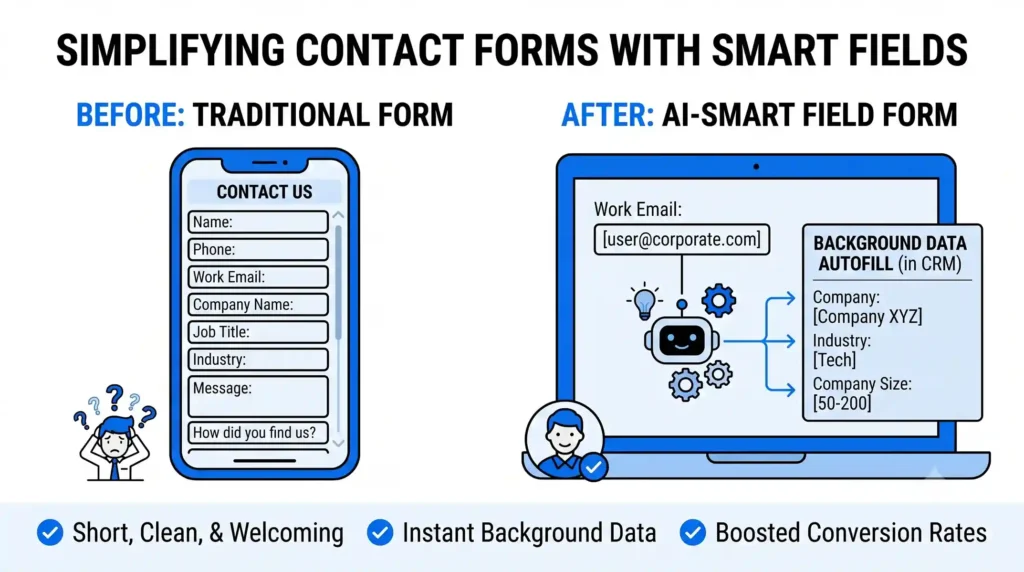
Traditional contact forms use strict “Conditional Logic” to show or hide fields based on what the user selects. This can create a rigid and frustrating experience, especially on mobile devices where typing is more difficult.
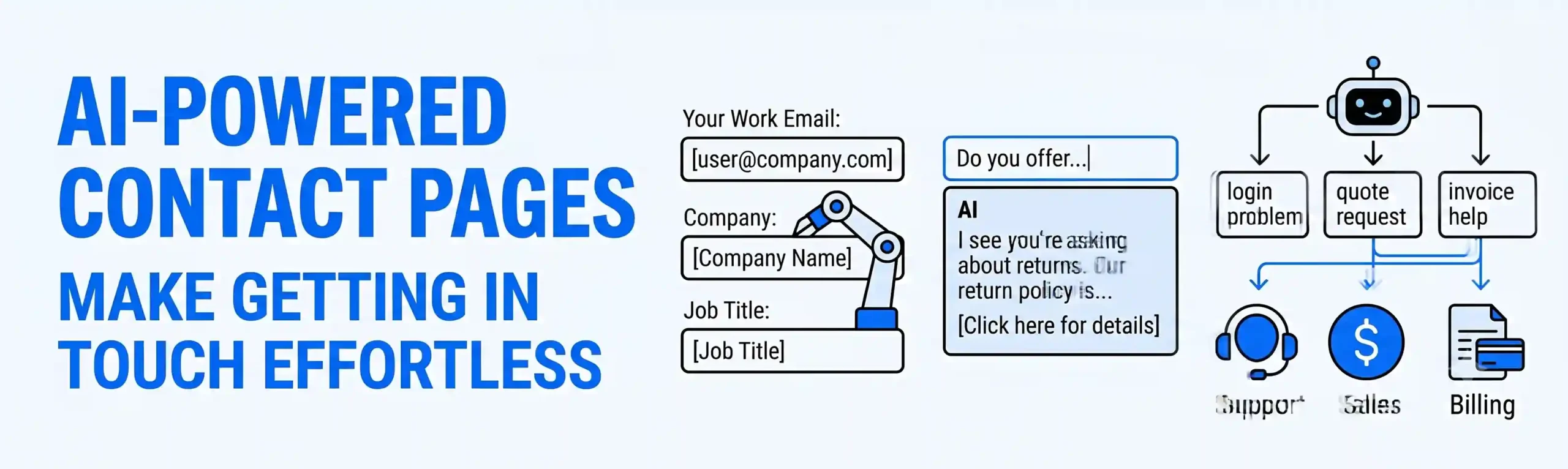
- How AI Helps: AI-driven forms use context clues and autofill capabilities to reduce the number of fields a user must type manually. If a user inputs their corporate email address, the backend AI can instantly cross-reference public data to identify their company name and industry, filling those data blocks automatically in your CRM.
- The Benefit: Your form looks short, clean, and welcoming. You can reduce a 7-field form down to just name, email, and message, significantly increasing your conversion rates without losing the background data you need to qualify the lead.
2. Auto-Suggesting Solutions Before Submission
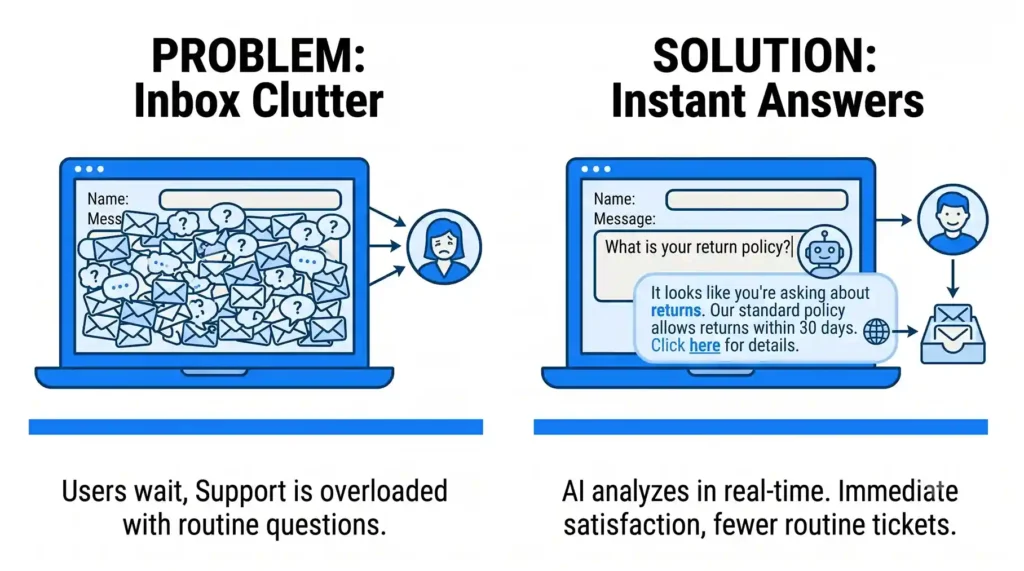
Many people use a contact form to ask simple questions that are already answered on your website. This clutters your inbox and forces the user to wait hours for a simple reply.
- How AI Helps: As a user starts typing their question into the “Message” box, an embedded AI assistant analyzes the text in real-time. If it recognizes a common query – like “What is your return window?” – a small text box appears below the field suggesting an immediate answer: “It looks like you’re asking about returns. Our standard policy allows returns within 30 days. Click here for details.”
- The Benefit: The user gets an instant answer without even having to click “Submit.” This provides immediate satisfaction for the customer and prevents a routine, unnecessary ticket from reaching your support team.
3. Intelligent Backend Routing
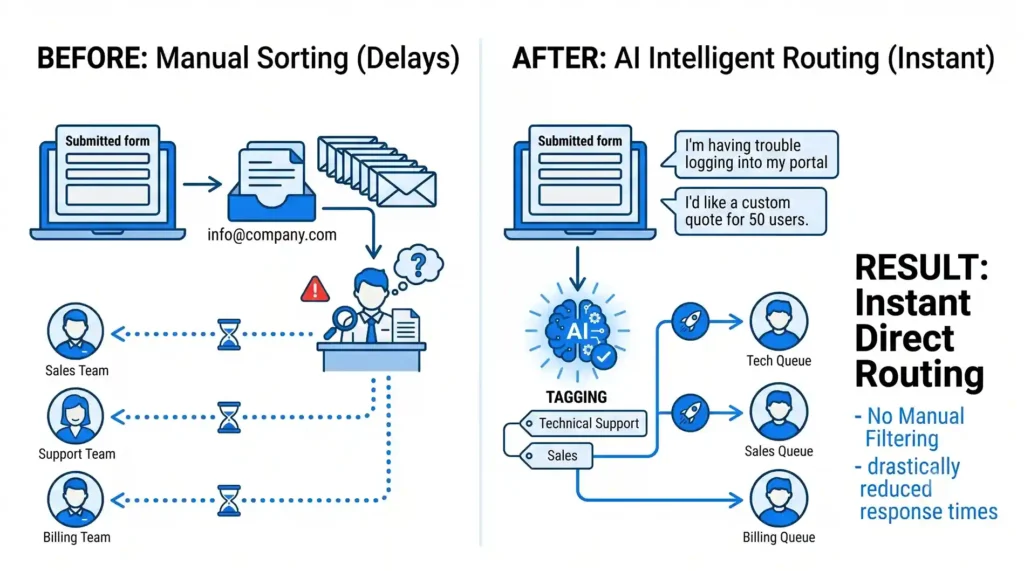
When a contact form is submitted, it usually goes into a general company inbox (like info@company.com). A human manager then has to read the message and forward it to Sales, Support, or Billing. This manual sorting causes massive delays.
- How AI Helps: Instead of relying on a human filter, an AI text classifier reads the submitted message instantly. It evaluates the language and intent to categorize the inquiry automatically. If the message says, “I’m having trouble logging into my portal,” the AI tags it as “Technical Support” and sends it straight to the tech queue. If it says, “I’d like a custom quote for 50 users,” it routes directly to the Sales team.
- The Benefit: You eliminate internal delays. Leads and support issues are placed in front of the exact person who can help them within seconds of submission, drastically reducing your business response times.
The Outcome: Faster Connections and Higher Conversions
A contact page should be a bridge, not a barrier. By using AI to shorten the physical form, provide instant answers to basic questions, and handle the backend sorting, you turn a static webpage into an intelligent digital receptionist. Your users save time typing, and your team saves time organizing.
At Nuclay Solutions, we focus on building frictionless user experiences. We help you integrate these smart AI workflows into your contact and lead-generation pages so that your information flows smoothly and your business responds faster.
Welcoming New Clients or Turning Them Away?
Stop losing high-value leads to rigid, complicated web forms. Connect with the Nuclay team to seamlessly optimize your website contact page.
Optimize Your Contact Page