Digital Marketing Agency vs Freelancer: Which Should Your Business Choose?
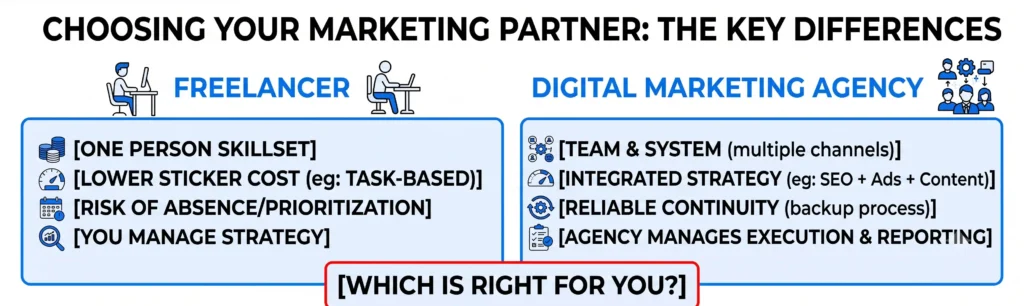
You’ve got a budget, a goal (more leads, more sales, more visibility), and two very different ways to spend that money. A freelancer looks cheaper and more flexible. An agency looks more expensive and more “corporate.” Neither answer is automatically right – it depends on what you’re actually trying to fix. This isn’t a “why agencies are better” pitch dressed up as a comparison. Freelancers are the right call in specific situations. Agencies are the right call in others. By the end of this post, you’ll know exactly which one fits your business right now, based on scope, speed, risk, and what happens when things go sideways – because something always does. What You’re Actually Comparing A freelancer is one person. An agency is a team, a process, and (usually) a set of tools and systems built from managing dozens of accounts. That difference sounds obvious, but it’s the root of almost every other tradeoff on this list. When you hire a freelancer, you’re betting on one person’s skillset, bandwidth, and availability. When you hire an agency, you’re buying into a system that’s designed to keep working even if one person is out sick, on vacation, or moves on to a new job. Neither structure is inherently better. A talented freelancer with 8 years of experience can easily outperform a junior in-house team at a mediocre agency. But structurally, they solve different problems. Cost: The Real Numbers, Not the Sticker Price Freelancers typically charge less per hour – often [$25-$75/hr] for a marketing freelancer, versus an agency retainer that might start around [$2,500-$5,000/month] for a small business package. On paper, freelancers win. But the sticker price hides the real cost comparison: If you only need one specific task done – say, optimizing a single landing page – a freelancer is almost always the cheaper, faster option. If you need an integrated strategy across SEO, paid, content, and email working together, stitching that together with 3-4 freelancers usually ends up costing more in time and coordination than one agency retainer. Speed and Availability A good freelancer can move fast – sometimes faster than an agency, because there’s no internal handoff between strategist, writer, and designer. If you need a single campaign turned around in 48 hours, a freelancer with the right availability can often beat an agency’s process. The tradeoff shows up when that freelancer gets sick, takes a two-week vacation, or picks up a bigger client and quietly deprioritizes you. There’s no backup. Your campaign pauses when they pause. Agencies are built to absorb that risk. At [Nuclay], for example, client work is never tied to a single person – if your account manager is out, someone else already knows the account and can step in without missing a deadline. Scope: What Are You Actually Trying to Get Done? This is the real deciding question, more than budget. Choose a freelancer if: Choose an agency if: A common mistake: hiring a freelancer for a job that actually needs a team, then getting frustrated when results stall because one person can’t realistically run SEO, paid ads, email, and analytics at the same level a specialized team can. Accountability: What Happens When Results Slip? This is the part most comparison posts skip, and it’s often the deciding factor. With a freelancer, if performance drops, you’re troubleshooting with one person – and if that relationship sours, you’re back to square one, rehiring and onboarding someone new from scratch. With an established agency, there’s typically a account structure, reporting cadence, and escalation path already built in. If a strategy isn’t working, there’s a team diagnosing why, not just one person hoping the next campaign performs better. Neither guarantees results. But agencies generally have more built-in process to catch problems early, simply because more eyes are on the account. When a Freelancer Is Genuinely the Smarter Choice To be direct: if you’re a solo founder or small team with a tight budget and one clear, contained task, a freelancer is often the smarter first move. Don’t let anyone (including an agency) convince you that you need a six-month retainer to get a landing page redesigned or a one-off email sequence written. The mistake is treating a freelancer as a full replacement for an integrated marketing strategy when your business has actually outgrown that scope. Which One Should You Actually Choose? If your need is narrow, temporary, or you already have marketing direction in-house, a freelancer is a smart, cost-effective choice. If you need multiple channels working together, reliable delivery, and a team that catches problems before they tank your results, an agency is worth the higher price tag. Not sure which side of that line your business falls on? Book a free consult with Nuclay and we’ll give you a straight answer – even if that answer is “you don’t need us yet.” Freelancer or Agency: Which One Do You Need? Not sure which side your business falls on? Book a free consult with Nuclay and we’ll give you a straight answer, even if it’s “you don’t need us yet.” Book Your Free Consult