At some point, every growing business hits the same wall: your sales team is in Salesforce, your marketing team is in a separate email tool, your support team is in a helpdesk platform, and your finance team is still exporting spreadsheets. Nobody has the full picture of a customer, and everyone’s working off slightly different data.
That’s the problem Salesforce CRM integration solves. Done right, it connects Salesforce to the other tools your business already runs on – your email platform, your accounting software, your website, your support desk – so information flows between them automatically instead of getting copied and pasted by hand.
This guide covers what Salesforce integration actually means, how it works, what it typically costs, the mistakes that derail most first-time integrations, and how to know if your business is ready for it. If you’re evaluating this for the first time, this should give you enough to have an informed conversation with whoever ends up building it.
What Does “Salesforce Integration” Actually Mean?
Integration means connecting Salesforce to another piece of software so the two can share data without manual entry. That’s it – the term sounds more technical than the concept actually is.
For example: when a customer fills out a form on your website, an integration can automatically create a lead in Salesforce, tag it with the right source, and notify the right sales rep – all within seconds, with zero manual work.
Common integrations we build for growing businesses include:
- Marketing platforms (Mailchimp, HubSpot, Marketo) – sync leads and campaign data both ways
- Accounting/ERP systems (QuickBooks, NetSuite) – sync invoices, payments, and customer billing status
- Support desks (Zendesk, Freshdesk) – give sales visibility into open support tickets
- Website/forms – auto-create leads and opportunities from web activity
- E-commerce platforms (Shopify, WooCommerce) – sync orders and customer purchase history
How Does the Integration Actually Work?
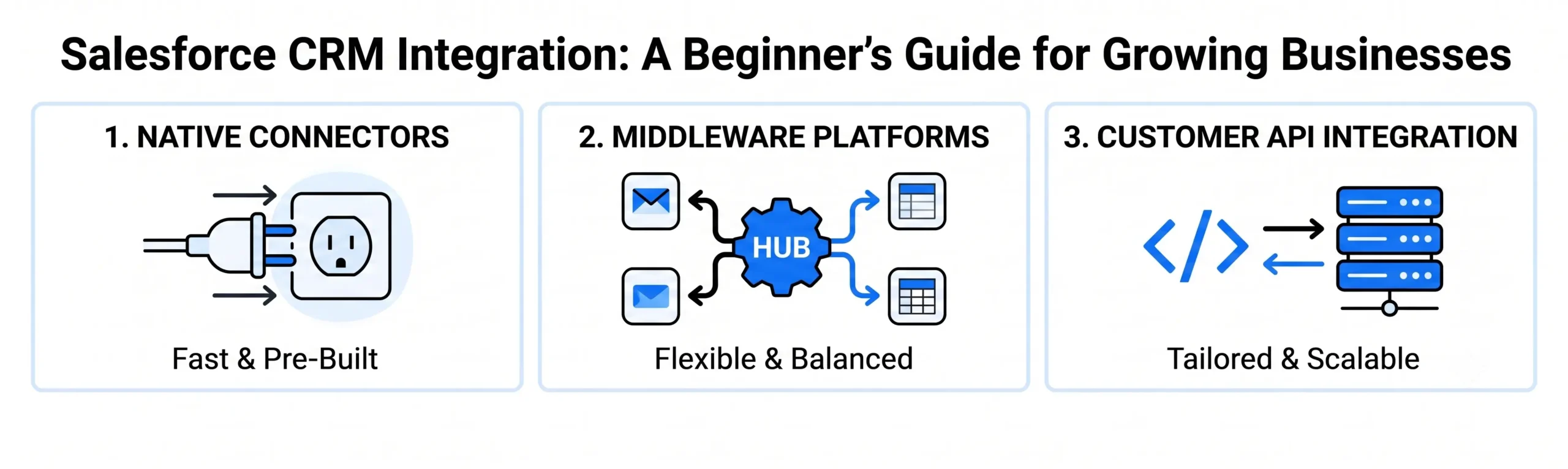
Most Salesforce integrations use one of three methods, and the right one depends on your tools and budget.
Native or AppExchange Connectors
Many popular tools have pre-built Salesforce connectors available through Salesforce’s AppExchange marketplace. These are the fastest and cheapest option – often a few hours of setup instead of weeks – but they only work if your specific tools have a connector built already, and customization is limited.
Middleware Platforms
Tools like Zapier, Make, or MuleSoft sit between Salesforce and your other software, moving data back and forth based on rules you set. This is the middle ground: more flexible than native connectors, less expensive than custom development, and a good fit for most small-to-midsize businesses with a handful of tools to connect.
Custom API Integration
For complex workflows or tools without existing connectors, integration happens through Salesforce’s API directly – custom code built specifically for your systems. This is the most powerful and flexible option but also the most expensive, and it’s typically only necessary once a business has outgrown what middleware can handle.
Our take: most businesses jump straight to custom development because it sounds more “proper,” but middleware handles 80% of real-world use cases at a fraction of the cost. Start there unless you have a specific technical reason not to.
What Does Salesforce Integration Cost?
This varies significantly based on complexity, but here’s a rough range based on the three approaches above:
- Native/AppExchange connectors: [$X–$X], often a subscription fee plus a few hours of setup
- Middleware integration: [$X,XXX–$X,XXX] for initial setup, depending on number of systems and workflow complexity
- Custom API integration: [$X,XXX–$X,XXX+], depending on scope
The bigger cost driver isn’t usually the connection itself – it’s data cleanup beforehand. Businesses that have years of duplicate contacts, inconsistent naming, and dead leads sitting in their CRM often need to clean that data before integration, or they just end up automating the mess.
5 Mistakes That Derail Salesforce Integrations
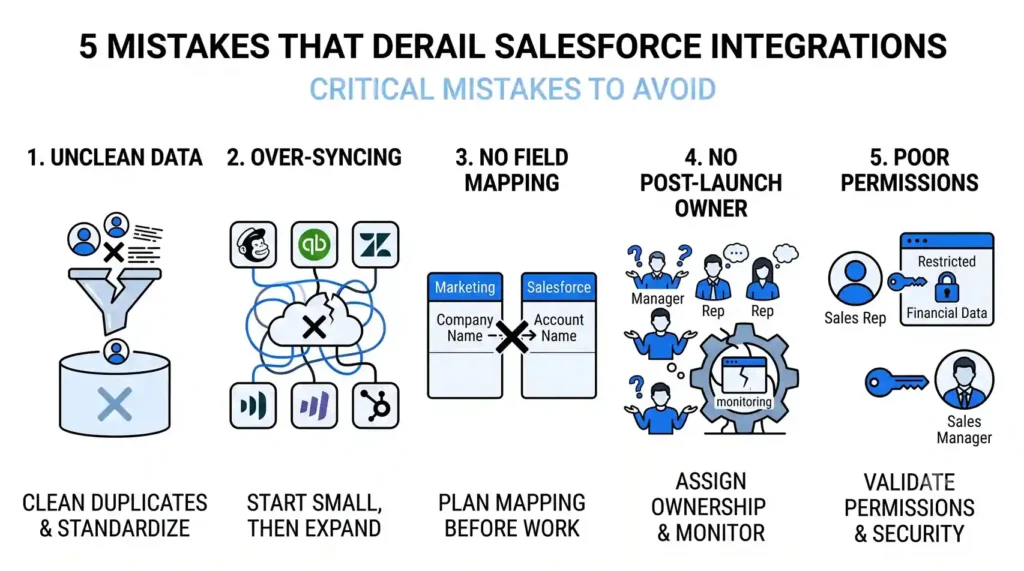
1. Integrating before cleaning your data. Bad data in equals bad data everywhere, faster. Clean up duplicates and standardize fields before you connect anything.
2. Trying to sync everything at once. The businesses that succeed start with one high-value integration – usually lead capture or invoicing – prove it works, then expand. Trying to connect five systems simultaneously multiplies the chances something breaks silently.
3. Skipping field mapping planning. If “Company Name” in your marketing tool doesn’t match “Account Name” in Salesforce, data either fails to sync or lands in the wrong place. This should be mapped out before any technical work starts, not discovered during testing.
4. No one owns it after launch. Integrations aren’t “set and forget.” APIs change, tools get updated, new fields get added. Without someone responsible for monitoring it, small breaks go unnoticed for months.
5. Underestimating user permissions and security. Not everyone in Salesforce should see everything flowing in from other systems. Getting permission structures wrong is a common – and avoidable – source of both security risk and internal confusion.
How Do You Know If You’re Ready for Salesforce Integration?
A few signs your business has outgrown manual data entry:
- Your team spends hours weekly copying data between tools
- Sales and marketing routinely work from different (and conflicting) numbers
- Leads fall through the cracks between systems
- You’ve had to explain to a customer why you didn’t know about their support ticket, order, or previous conversation
If two or more of these sound familiar, integration will likely pay for itself in reclaimed hours within the first few months.
The Bottom Line
Salesforce integration isn’t about connecting every tool you own – it’s about closing the specific gaps costing your team time and your customers a good experience. The businesses that get the most value start narrow, get one integration right, and build from there.
If you’re not sure where to start or which approach fits your setup, talk to our CRM team – we’ll walk through your current tools and tell you honestly what needs to be connected first, and what can wait.
Is Siloed Data Slowing Your Growth?
Stop wasting hours copying data across tools. Talk to the Nuclay CRM team to connect your stack and automate your workflows.
Build Your CRM Strategy